MySQL Storage Engines: InnoDB vs MyISAM
A practical comparison of MySQL storage engines: the differences between InnoDB and MyISAM, their trade-offs, and which one to choose.
Every time you create a table in MySQL, a storage engine is working behind the scenes. The storage engine determines how data is written to and read from disk, how locks are managed, and whether transaction support is available. Since MySQL 5.5, the default engine has been InnoDB — but in legacy projects, you can still encounter MyISAM tables. Understanding the difference between the two is directly useful if you’re dealing with a performance problem or taking over an inherited system.
Short answer: if you’re starting a new project in 2021, use InnoDB. But answering the “why” is more instructive.
MyISAM: speed-focused, simple by design
MyISAM is an extended version of the ISAM engine. Its design is relatively straightforward, and that simplicity brings both advantages and limitations.
Each MyISAM table is stored on disk as three files:
.frm— table structure.MYD— row data.MYI— indexes
There’s a practical benefit to this separation: you can place the data and index files on different physical disks to spread the I/O load. But that advantage has largely become irrelevant in most modern setups thanks to SSDs and RAID.
MyISAM’s limitations
Table-level locking is MyISAM’s biggest weakness. When a write operation begins, the entire table is locked — all other read and write requests have to wait. In low-concurrency scenarios this isn’t a problem, but as soon as multiple writes hit the same table, response times deteriorate quickly.
There is no transaction or foreign key support. This means it’s impossible to run multiple queries atomically on MyISAM tables. You cannot roll back a partially completed operation.
In the event of an unexpected crash — hardware or software — MyISAM tables can become corrupted. REPAIR TABLE can fix them, but it’s not guaranteed. InnoDB’s crash recovery mechanism handles this scenario automatically.
Does MyISAM have any remaining advantage?
MyISAM offered full-text search support very early on. But since MySQL 5.6, InnoDB also supports full-text search, so that gap has largely closed. The only real advantage that remains: on tables with very heavy reads and almost no writes — where locking and data integrity are non-issues — MyISAM can be marginally faster. That difference isn’t meaningful for most applications today.
InnoDB: solid ground
InnoDB is a general-purpose engine that balances reliability and performance.
Row-level locking
InnoDB locks at the row level. Two queries updating different rows at the same time don’t block each other. In applications with heavy concurrent writes — order processing, user updates, inventory management — this difference is directly measurable.
Transaction support
InnoDB offers ACID-compliant transaction support. You can execute multiple queries as a single atomic unit:
START TRANSACTION;

UPDATE hesaplar SET bakiye = bakiye - 500 WHERE id = 1;
UPDATE hesaplar SET bakiye = bakiye + 500 WHERE id = 2;

COMMIT;
If an error occurs at any point, ROLLBACK undoes everything. Without this, financial operations, order flows, or any scenario requiring consistency cannot be modeled safely.
Foreign keys and referential integrity
InnoDB enforces foreign key constraints. This ensures data consistency at the database level — a missed check in the application layer can’t leave the database in an inconsistent state.
Clustered index architecture
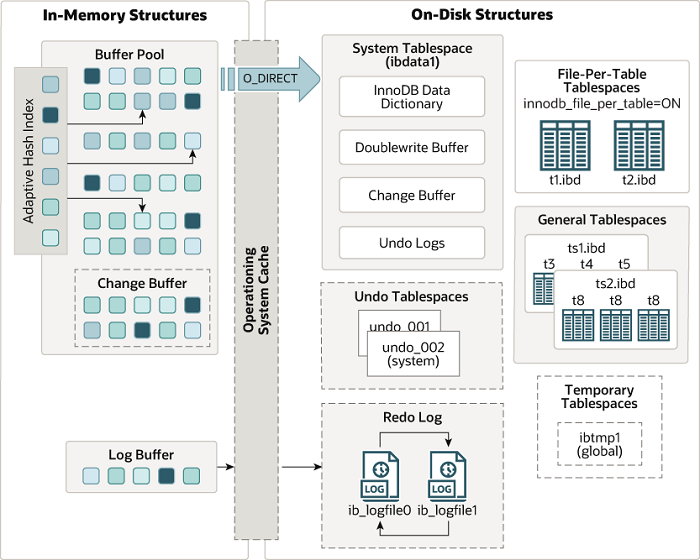
InnoDB stores each table’s data in sorted order by primary key. This structure is called a clustered index. Queries using the primary key go directly to the right page without a secondary index lookup. When primary key columns are used in WHERE, ORDER BY, and JOIN operations, this architecture delivers noticeable gains.
Crash recovery
InnoDB writes changes to a redo log before committing them. When MySQL restarts after an unexpected crash, it uses that log to return to the last consistent state. No manual intervention is required.
Memory usage
InnoDB uses a buffer pool mechanism to keep both data and indexes in memory. This reduces disk I/O and lowers response times for frequently accessed data. The trade-off: it consumes more memory compared to MyISAM. On smaller servers, tuning the buffer pool size with innodb_buffer_pool_size matters — the commonly recommended value is 70–80% of total RAM.
Comparison
| Feature | InnoDB | MyISAM |
|---|---|---|
| Transactions | Yes | No |
| Foreign keys | Yes | No |
| Locking | Row-level | Table-level |
| Crash recovery | Automatic | Manual repair may be needed |
| Full-text search | MySQL 5.6+ | Available in older versions too |
| Memory usage | Higher | Lower |
| Read-heavy workload | Good | Slight advantage |
| Write-heavy workload | Clear advantage | Inadequate |
Which engine, and when?
InnoDB: Any scenario requiring transactions, foreign keys, or concurrent writes. If you’re creating new tables today, don’t change the default — InnoDB is the right choice.
MyISAM: Very few cases remain: very old MySQL versions (pre-5.5) or highly specialized read-only cache tables. Outside of those, there’s no reason to use MyISAM for new tables.
On an existing project, you can check the engine of current tables with SHOW TABLE STATUS:
SHOW TABLE STATUS FROM veritabani_adi\GTo convert MyISAM tables to InnoDB:
ALTER TABLE tablo_adi ENGINE = InnoDB;On large tables, this conversion should be planned during a maintenance window — the table may be locked for the duration of the operation.
MySQL didn’t make InnoDB the default by accident. Its locking model, crash recovery, and transaction support meet the fundamental guarantees that modern applications expect. The MyISAM “faster reads” argument, meanwhile, rarely produces a measurable difference in most scenarios today. If you’re inheriting a legacy project and see MyISAM tables, migrating to InnoDB is a reasonable step unless you have a compelling reason to delay.
Comments
Sign in with your GitHub account to join the discussion. Comments are stored in GitHub Discussions.